













 AEO and Answer Engine Optimization
 SEO Services and Search Engine Optimisation
 GEO and AI Search Visibility
 Social Media Content and Community Management
 Influencer and Creator Partnerships
 Digital PR and Link Building
 Local SEO and Google Business Profile Management
 Content Marketing
 App Store Optimisation
 E-commerce SEO Services
 Multi-location Map Management and Reporting
 Google Maps and Business Profile Management
 Review Management and Removal Request Tracking
 E-commerce Website Design
 Google Workspace Setup and Management
 Business Email Migration
 Email Deliverability
 Corporate Website Design
 AI-Assisted Website Development
 Website Management and Maintenance
 Shopify E-Commerce Design and Management
 Landing Page Design
 AI-Assisted Creative and Content Production
 AI Chatbot Setup
 Conversion Rate Optimisation and UX
 Ongoing Design and UX Support
 Brand Strategy and Corporate Identity
 Web Accessibility Audit
 Business Web Application Development
 AI and CRM Consulting
 Salesforce Setup and Consulting
 HubSpot CRM and Marketing Automation
 Zoho CRM Setup and Management
 GA4 and Google Tag Manager Setup
 Digital Marketing Data and Reporting
 Email, SMS, and Customer Retention
 AI Strategy and Roadmap
 AI Agents and Workflow Automation
 Marketplace Store Management
 Digital Marketing Strategy and Annual Roadmap
 Digital Marketing Consulting
 Fractional Marketing Leadership
 Digital Marketing Training and Workshops
 Performance Marketing Management
Build automation for recurring tasks with defined boundaries and checkpoints.
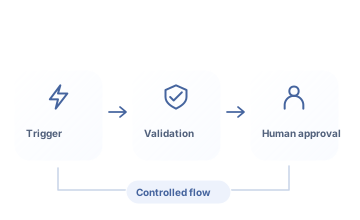
AI agent and automation development connects triggers, tool access, and verification steps in a controlled workflow. ReklamKlik defines approval steps, retries, and error handling, then tests the pilot against actual task scenarios.
Let’s turn your needs into a clear work plan.
Automating work also means its errors can spread automatically. ReklamKlik defines inputs, expected outputs, and human oversight from the start. Agent access is limited; errors, retries, and costs are monitored to make the process operationally manageable.
What will you have at the end of the work?
- Task and permission flow design
- Pilot and error-scenario tests
- Logging and usage cost plan
Scope, delivery schedules and responsibilities are clarified together during the quotation stage.
Who is it for?
Businesses with defined, recurring information tasks. Reliable workflows and clear human decision points.
Where should we start the conversation?
- Tasks to automate
- Tools and data sources to connect
- Human approval and usage limits
What do we address together?
Implementations planned around your needs and the scope of each area.
Workflow and trigger model
Triggers, task data, tool calls, and expected results are defined as a flow. Repeated tasks are designed to avoid duplicate actions.
Least-privilege tool access
Tool permissions are limited by task. Read and write permissions are separated; critical actions such as payments, publishing, or budget changes require explicit authority and human approval.
Validation and human approval
Model outputs are validated against required fields and business rules. Actions requiring approval are not converted into uncontrolled tool calls.
Queues, retries, and idempotency
Queue, timeout, and retry limits are defined. Operation identifiers and record checks prevent repeated tasks from creating duplicate customers, emails, or transactions.
Output quality tests
We test normal tasks, missing data, tool errors, and misleading inputs. Acceptance criteria include compliance with business rules and safe human handoff as well as output format.
Logs and cost limits
Task outcomes, errors, and costs are monitored. Access, usage quotas, and budget limits are defined at the start of the pilot.
A clear purpose and deliverable at every step.
From initial assessment to implementation, and from implementation to regular improvement.
Selecting suitable work
Triggers, data inputs, and expected action results are mapped into a flow. Tool access and approval steps are documented in the pilot scope.
Controlled pilot and testing
A prototype is built with limited permissions. Repeated runs, incorrect tool responses, and human approval scenarios are tested within logging and cost limits.
Monitoring and maintenance
Correctly completed work, interventions, and processing costs are reviewed. Scope is not expanded before access and error handling are verified; maintenance responsibilities are handed over.
How do we assess success?
- Correctly completed work
- Processing cost and intervention rate
Correctly completed tasks, duplicate actions, human interventions, and processing costs are tracked. High tool-call volumes are not proof of efficiency; critical write actions are restricted by explicit authority.
Questions about AI Agents and Workflow Automation.
Can an agent change campaign budgets?
Only within an explicitly authorized scope and control flow. Report-reading and budget-changing permissions are separated; critical write operations require human approval and a change log.
Does the process stop when an error occurs?
Failure handling and human intervention routes are designed at the outset.
What does the agent do if a tool does not respond?
Timeouts, limited retries, and team handoff are designed in advance. The agent is prevented from repeating writes and creating duplicates before the outcome of the previous action is known.
Services contributing to the same goal.
Services we can plan together
AI Chatbot Setup
Accurate answers, human support when needed.
Discover the service ↗ Analytics & CRM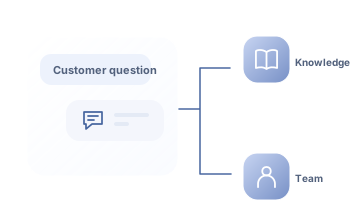
AI and CRM Consulting
From customer information to supervised suggestions.
Discover the service ↗ AI & Automation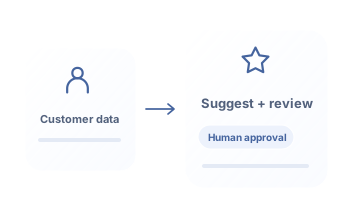
AI Strategy and Roadmap
A realistic roadmap for AI investment.
Discover the service ↗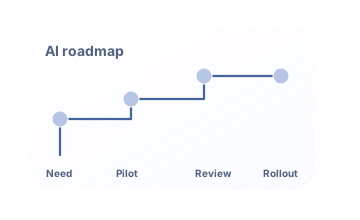
Before choosing a service
ask the right questions.

Request a quote for your needs.
Share your goal and current situation. Let’s define scope, priorities and the next step together.
0543 862 94 05merhaba@reklamklik.com