













 AEO and Answer Engine Optimization
 SEO Services and Search Engine Optimisation
 GEO and AI Search Visibility
 Social Media Content and Community Management
 Influencer and Creator Partnerships
 Digital PR and Link Building
 Local SEO and Google Business Profile Management
 Content Marketing
 App Store Optimisation
 E-commerce SEO Services
 Multi-location Map Management and Reporting
 Google Maps and Business Profile Management
 Review Management and Removal Request Tracking
 E-commerce Website Design
 Google Workspace Setup and Management
 Business Email Migration
 Email Deliverability
 Corporate Website Design
 AI-Assisted Website Development
 Website Management and Maintenance
 Shopify E-Commerce Design and Management
 Landing Page Design
 AI-Assisted Creative and Content Production
 AI Chatbot Setup
 Conversion Rate Optimisation and UX
 Ongoing Design and UX Support
 Brand Strategy and Corporate Identity
 Web Accessibility Audit
 Business Web Application Development
 AI and CRM Consulting
 Salesforce Setup and Consulting
 HubSpot CRM and Marketing Automation
 Zoho CRM Setup and Management
 GA4 and Google Tag Manager Setup
 Digital Marketing Data and Reporting
 Email, SMS, and Customer Retention
 AI Strategy and Roadmap
 AI Agents and Workflow Automation
 Marketplace Store Management
 Digital Marketing Strategy and Annual Roadmap
 Digital Marketing Consulting
 Fractional Marketing Leadership
 Digital Marketing Training and Workshops
 Performance Marketing Management
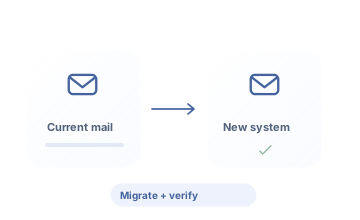
Migrate business email with a plan defining scope and checkpoints.
Business email migration plans mailboxes, transferable data, and the cutover sequence around source and destination systems. ReklamKlik verifies with a pilot user and manages DNS changes, client settings, and missing-data checks together.
Let’s turn your needs into a clear work plan.
When changing email providers, explain in advance how historical correspondence and daily communication will be preserved. ReklamKlik reviews source and destination systems and plans migratable data, a pilot, and user checks. We manage the cutover around your business’s working arrangements.
What will you have at the end of the work?
- Mailbox and transfer inventory
- Pilot and cutover verification plan
- Data and user access verification
Scope, delivery schedules and responsibilities are clarified together during the quotation stage.
Who is it for?
Businesses changing email infrastructure or consolidating different email systems. Suitable for teams planning mailbox, calendar, and user transitions around business continuity.
Where should we start the conversation?
- Source and destination email systems
- Mailboxes and data volume
- DNS access and suitable migration timing
What do we address together?
Implementations planned around your needs and the scope of each area.
Source and destination system and access suitability
We check source and destination providers’ access, export, and migration tool requirements. Administrator access does not mean every item can automatically be migrated.
Mailbox, data volume, and migratable item inventory
Mailboxes, data volume, and migratable email, contact, and calendar items are inventoried. Source and destination support limits are recorded in the migration plan.
Pilot user migration and verification
We inventory users, mailboxes, and data scope before migration. Pilot accounts are used for verification, and the migration window, DNS step, and rollback conditions are defined with your business.
DNS and cutover sequence and a suitable maintenance window
After the pilot, we define the main cutover and final synchronization sequence. MX and DNS changes, user announcements, and the maintenance window are planned with documented rollback conditions.
User clients and new access checks
Sending and receiving are tested in the new account through the web and the clients in use. Account setup and access requirements for old local archives are checked per user.
Error and missing data assessment and legacy system shutdown plan
Errors and missing items are compared using source and destination samples. The old system remains open until verification and acceptance are complete; license termination and archive ownership are assigned.
A clear purpose and deliverable at every step.
From initial assessment to implementation, and from implementation to regular improvement.
Reviewing data, access, and migration risks
Mailboxes, data volumes, and item types are inventoried. Migratable data and exceptions are documented after reviewing source and destination support.
Pilot transfer and user verification
Transfer and access are verified with a pilot user. The migration window, DNS sequence, and user communication are implemented according to the results.
Phased transition, checks, and closure
Mailbox and item checks are completed. Errors and remaining archive needs are included in the acceptance record, and the legacy system shutdown decision is made with the business.
How do we assess success?
- Mailboxes with completed checks
- Transfer error and missing-item records
- User access checks
We track checked mailboxes, sample item matches, error records, and user access. Differences in item counts are investigated; a zero-error report does not mean every data type was transferred.
Questions about Business Email Migration.
Will all old emails and other items be migrated?
We review the source system, destination tool, and data format. Supported email, calendar, contact, and folder scope is explained separately; unsupported items are not silently treated as included.
Will the cutover have no downtime?
The migration plan aims to preserve communication; source and destination access, DNS propagation, and other conditions are assessed. Absolute continuity or lossless migration in every circumstance is not guaranteed.
When can we shut down the old system?
Shutdown is planned after pilot and main transfer verification and acceptance of remaining errors and archive needs. A DNS change alone does not mean data checks are complete.
Services contributing to the same goal.
Services we can plan together
Request a quote for your needs.
Share your goal and current situation. Let’s define scope, priorities and the next step together.
0543 862 94 05merhaba@reklamklik.com